Articles by "Tricks&Tips"

Showing posts with label Tricks&Tips. Show all posts

Rubik's cube is a widely popular mechanical puzzle that requires a series of movement sequences, or algorithms, in order to be solved. Many of you have likely watched the tutorial videos that teach you how to solve the cube, but don't know or cannot remember those long, boring algorithms.


Therefore, I have created a handy cheat sheet of the algorithms that you can whip out at a moment's notice and use to solve the Rubik's Cube with ease. If you're looking for a guide or tutorial that shows you how to solve the Rubik's Cube, there are plenty articles and videos out there to help you (I've included a couple of great videos at the end of this hub). However, this hub likely won't make much sense or be very useful unless you already know the basics of how to solve a Rubik's Cube


The Basic Movement Notations!


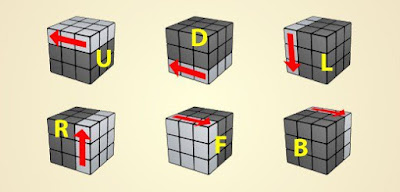
Understanding the basic move notations are essential to understanding the algorithms. Each notation designates one of the cube layers that should be turned clockwise 90 degrees (or 1/4 of the way around the cube).

Standard notation for the Cube is UP, DOWN, RIGHT, LEFT, FACE, and BACK, or U, D, R, L, F, B for short.
  • U for Up
  • D for Down
  • L for Left
  • R for Right
  • F for Front
  • B for Back
These refer to the different layers of the cube. Remember, though, that the notations are all relative and are determined based on the Cube's orientation. FACE, for instance, refers to the layer that faces you when you hold the cube.

When the notation has an apostrophe - for example U' - that means you should move that layer counter-clockwise 90 degrees. See the full list of movement notations below.

Rubik's Cube Algorithms List

Quick List of Rubik's Cube Algorithms 3x3

Step
Algorithm

#1: Getting the "white cross"
F' U L' U'
#2: Placing the corners of the cross
R' D' R D
#3a: Right edge piece placement
U R U' Ri U' F' U F
#3b: Left edge piece placement
U' L' U L U F U' F'
#4: The white cross
F R U R' U' F'
#5: Aligning the third layer center pieces
R U R' U R U U R'
#6: Aligning the third layer corner pieces
U R U' L' U R' U' L
#7: Finishing the cube
R' D' R D

These are the Algorithms that are necessary to solve the Rubik's Cube and the step in the process where they are used.

Today I am Share a tricks about This URL has been blocked from Department of Telecommunications Problem.It is a major problem when we browsing a web site. It happens DNS server.


When we open a site it's show “Your requested URL has been blocked as per the directions received from Department of Telecommunications, Government of India. Please contact administrator for more information.
Now follow the steps,

Follow Steps:

  1. step Download This App click Here Current Below
  2. Download

    Click to Start Download

    File Size: 1.84MB

  3. step unrar file Password is   priosoft
  4. step Run exe file and visit blocked site its open :D
Any type of information please Contact us.

Basically engineering students need a Good quality Scientific Calculator for Problem Solving.Now-a-days several duplicate and local companies calculator are available in the market with low prize and impressive outlook for sales. But they didn't care about battery cell backup , button quality and more features such as software also.

How to Test/Check/Hack Casio Scientific Calculator fx-991MS, fx-991ES (Calculator Trick!).


Here are some steps to check whether the calculator software is original,

Follow Steps:


  1. Step : Press and hold Following Three buttons at same time

  2. How to Test/Check/Hack Casio Scientific Calculator fx-991MS, fx-991ES (Calculator Trick!).

    Shift button
    ➳Number7 button
    ONbutton.

    ➳Now in the display screen, you should see all options or all pixels are ON.

    How to Test/Check/Hack Casio Scientific Calculator fx-991MS, fx-991ES (Calculator Trick!).


  3. Step : Then press Shift button continuously till Number 1 appears on the screen.

  4. How to Test/Check/Hack Casio Scientific Calculator fx-991MS, fx-991ES (Calculator Trick!).

  5. Step: Now press all the buttons in the calculator starting fromAlpha button sequentially, except  for the ON button..

  6. How to Test/Check/Hack Casio Scientific Calculator fx-991MS, fx-991ES (Calculator Trick!).

  7. Step: After pressing all buttons,

➳finally press =
➳then it should show 44 Ok .
➳If it shows, 44 OK' then the calculator is good for your Engineering Mathematics..

If u Confuse or not understood please watch this video given current below:


Basically CASIO is a Good brand for Calculators...
Enjoy Calculating :-)

PPC (Pay per Click) or CPC is the term which mostly commonly used in advertising industry. Any person or company who belongs to advertisement industry as advertiser or publisher always focus on PPC. Now the question is what does PPC is ?. In short it mechanism followed for serving ads. Advertisers want traffic on their website so they invest in ads on the bases of pay per click. On the other side publishers want to earn money so they place ads on their website or blog which pay him on the of pay per click. So that means PPC is the main reason behind the relationship of advertiser and publisher. Through 3rd party ppc ad networks, advertiser who want visitors for their business. Publisher who want to earn revenue for placing ads. Both parties join ppc ad network according to their need. Means when the visitors of Publisher site click on the  advertiser ads unit. Then Advertiser have to Pay for each successful valid click. So if you want understand the whole concept of PPC then i recommend to read How Does  PPC Works ?


Every Blogger or Webmaster dreams to make some money from there website or blog through ads. PPC ads is the effective way to earn revenue for content. By placing Pay per click ads on web page where huge traffic is coming. When someone show interest in ad and visit it. Then publisher will earn money. But major problem faced by advertiser and publisher is while finding best ppc ad networks. Their are many best pay per click sites are available in market but some of them are paying to much low. So in this article i am going to list out best ppc ad networks for publishers & Advertisers. Choose according to your requirement and blog traffic.

Best (Pay Per Click) PPC Ad Network For Publishers:

Google Adsense

Google Adsense is one of the best pay per click site. No doubt every blogger and website owner wants to earn through Adsense because there are reasons behind the success and Adsense Popularity. In short Adsense is Bid based CPC and RPM networks and there are lots of advertisers bases on the niche of sites. Adsense offers highest CPC rates and show more targeted ads related to content which increase the CTR rate and helps to earn more revenue. Adsense rates varies on the bases of relevant and irrelevant ads. It CPC rate vary between the range of $0.02 – $15 depend upon the location of visitor and niche of the blog.
Ad Format:- Responsive Ads, Display Ads, Text Ads, Link Ads, Match Content Ads.
Payout:- $100 via cheque, EFT, Wired transfer, Western Union.Google Adsense sign up

Bidvertiser


Bidvertiser is also a best choice if you are not able to get an approval from Adsense. Bidvertiser is also famous and oldest best pay per click site and even perform well at some kind of blogs. It CPC rates are best as compare to other small networks just because they offer POP up, Banner and various other typing advertising techniques. Its CPC rates vary from approx 0.02 to $10 and you get earning bases on total earn point. Overall performance is best if have sufficient account of traffic.
Ad Format:- Banner Ads, In-text, Domain Parking, XML Feed ads, Contextual Ads, Search Toolbar
Payment:- Minimum Payout $10 via PayPal.Bidvertiser sign up

RevenueHits


RevenueHits is the best ppc ad network for publishers who want to generate more revenues with state of the art Contextual & Geo targeted Ad Serving technology. RevenueHits provides self services for publishers, where any webmaster can come and get tags and start making money. They also offers a self service for Advertisers, where anyone can come and buy very high quality traffic.
Bottom line – if you want to take your website or blog’s income generation to the next level, this is the best solution around. RevenueHits is the best ad network for monetizing websites.
Ad Format:- Display Ads, Text Ads, Pop up/under
Payout:- $50 via PayPal.RevenueHits sign up

InfoLinks Ads

Infolinks is In-text link based ppc ad network. If you have text based rich site or blog then Infolinks is best choice for earn some revenue. The best part of Infolinks is they don’t need and space for banners. Infolinks show targeted ads for any relevant keyword from you content. You can also use keyword Tag cloud from Infolinks on you site or Infolinks can be use as search ads.  Infolinks don’t cover the spaces so that’s why you can use other ads banner from Adsense or other alternative to earn more revenue for site content.
Ad Format:- In-text ads, Search ads or In Tag cloud.
Payment:- Minimum Pay out $50 via PayPal or wire transfer.

Propeller Ads

Propeller is fastest growing multi ad format network. They provide detailed optimization for each site individually so that you can select best performing ad campaign. Its basically shown as CPM based ad network. But in actual this network is based on various models like CPM, CPA, CPC and CPL. In overall this is one of the best ad network.
Ad Format:- OnClick Ads, Video Ads, Mobile Ads on CPM, CPA, CPL and CPC bases.
Payout:- $100 Via Wire Transfer, Payoneer, Payza.

Clicksor Ads

This is also one of the best Alternative for other in-text based as well for banner ads. Clicksor is best and popular platform of advertiser and publisher. Clicksor having several advertising format like in-text ads and contextual banner ads. Clicksor divides publisher in two groups on the bases of total impressions. Clicksor is Bid based CPC and CPM ads networks. Its offer less CPC rates as compare to above Sites. If also offer Referral Program mean you earn 10% revenue from the Publisher you refer for using Clicksor.
Ad Format:- In-text and contextual banner ads, Pop under and other text based ads.
Minimum Payout:- $50 through check or PayPal.Clicksor sign up

SuperLinks

Superlinks is fastest growing new display based advertising network. Superlinks is one the best adsense alternative you don’t need to worry about adsense if you are using superlinks. Superlinks offer Super Exit link, Super display ads, Super Footer, Super Interstitial, Super tower with various different size of banners. Superlinks is working through Google doubleclick network that means in case no highest paying banner is visiable then adsense ads will be displayed to fill space. Superlinks is one the best solution for you they offer CPC and CPM based earning. Minimum payout is $100 via PayPal and $500 via payoneer wire transfer on the bases of NET35. So i recommend you to join superlink right now. Superlinks sign up


Chitika Ads

Chitika is also famous platform of pay per click bases of Search Targeted Ads, Local ads and Mobile Ads. Chitika ads are accepts only organic traffic drive by Search engines. So you will only earn revenue from clicks, if you have good visitor flow from search engines. Chitika Offers high CPC rates as compare to others but little bit low as compare to Adsense. But instead of others it is also good Adsense alternative. Chitika has Referring Program also you can refer others for using Chitika ads then you will earn 10% of Refer Publisher review for 10 months.
Requirement:- Organic Search Traffic is required for earning.
Ad Format:- Display banner ads, Text Ads.
Payout:- $10 via PayPal and $50 via Checks.Chitika sign up


Media.net Ads

Media.net is a Contextual pay per click based site by Combined Yahoo and Bing and powered by Media.Net. It is one of best Alternative of Adsense. Its CPC rates are also high and good. It is also Bid based CPC and CPM and CPA ads on the bases of eRPM. Media.net become most popular for advertiser and publisher within few years and makes best place in advertising. Unfortunately if you don’t get Adsense approval then i recommend you to apply for Media.Net
Requirement:- High quality content and Traffic from premium countries like USA, UK, Canada.
Ad Format:- Display Ads, Keyword Block Ads.
Payout:- $250 via PayPal or Wire Transfer.Media.net sign up


Affinity Ads

Affinity has also make their best place in advertising market. Affinity has adopts many different kind of ways for publisher to earn more revenue from their website by implementation in Toolbar, In-text, search suggestion, gaming ads, widget and such kinds of amazing implementation. Affinity is also Bid Rates network based on CPC , CPM and CPA with better eRPM rates. Affinity have highest revenue sharing upto 95% as compare to others.
Ad Format:- In-Search, In-Domain, In-Content, Display Ads, Mobile Ads.
Minimum payout:- $50 via PayPal.

Kontera Ads

Kontera is almost similar to Infolinks ads networks. It is based on In-text and in-image ads for your text content for any selected keywords. Kontera show relevant ads for keyword shown in double underline which is also looks irritating for users . Kontera offers Less CPC rates but they having higher CTR rates. Kontera is also compatible which Google Adsense and other Networks. They also don’t need any space of banner placement. So it is better way to earn side earnings with other Banners based ads. Kontera share 70% revenue with Publishers
Ad Format:- In-text based ads
Minimum Payout:- $50 PayPal or Wire Transfer.

Conversant Media

Conversant media Ads hold best position in advertising networks. It is based on CPC and CPM methods. Advertisement format used by Conversant have contextual ads, different size of banner, pop ads and many other different format. Its offers good CPC, CPM and CPL rates better lesser as compare to above networks.
Ad Format:- Display Ads, Text Ads, Video Ads, Mobile Ads, In-text, Flash ads
Minimum Payout:- $25 vie PayPal.

AdHitz

AdHitz is growing advertiser platform but its performance on the publisher platforms not so good. AdHitz having number different types of advertiser but their offers less CPC rates as compare to other publisher networks so that’s why publisher choose Adhitz lesser ad compare to others. But if their is no choice left then i recommend you to choose Adhitz. Otherwise try on another ads programs first.
Ad Format:- Flat Rates PPC ads, Banner Ads.
Minimum payout:- $25 via PayPal.


I hope You enjoy this article about best ppc ad networks for publishers. I try explain only the best ppc networks from where you can earn some revenue. Their are numbers of PPC publisher site are available which we have not listed just because of their low cpc rates and performance. So i recommend you to choose any network which you like. We have updated new list of best ppc ad network for publisher on our new blog. Must check it for all new coming ppc ad networks.
Note:- Don’t use more that 2,3 three different networks on same site. Their are many bad effects on site as well on earnings also.
If you have any other best pay per click website feel free to share your experience in comment box.

Website and blog are the only way to provide information or thought on internet. Internet is nothing with websites. As we use different type website, blogs while internet surfing in which some of are blogs, eCommerce websites, social media sites like Facebook, twitter and other these all website are available in desktop view and even in mobile version. Desktop version is considers as Website and Mobile version mostly considered as WapSite. So these mobile wapsite are also popular and widely used on mobile phones. Recently i also listed out some of the best platform to Create Free Instant Website and also for Free instant Business or personal Web Portfolio. So if are deciding to start your free mobile website but don’t have any idea from to start, don’t worry today i will share some platform where you can easily create free websites for mobiles.

Top Mobile Website/Wapsite Site Builders' Reviews.| prio-soft

XtGem:

Top Mobile Website/Wapsite Site Builders' Reviews | prio-soft
Xtgem is the famous and best mobile site builder platform where you can easily create mobile website or forum. Xtgem provides best tools and features in their panel which includes domain parking, custom error pages, Style sheets, uploading files, downloading files, image tools, header tags, footer auto content and many more settings are providing by Xtgem to build a good looking mobile website. Xtgem having both plans free and paid. In free version they include ads but in paid all features are available like domain parking and ads free page view. Overall performance of Xtgem is good and it is trusted and famous platform by millions of users.
Website Link: Click Here

Wen.Ru:

Top Mobile Website/Wapsite Site Builders' Reviews | prio-soft
Famous platform for wapsite. Wen.Ru is most widely used platform but the only problem for worldwide user is language. Wen.Ru is Russian based wapsite platform and free to use. You can easily translate website on Google Chrome so it make it easy to register and make your wapsite free. Wen.Ru site builder supports and edition of WML pages, color HTML and xHTML pages (WAP 2.0). You can also create images in JPG, PNG, GIF animation format. In Wen.Ru you don’t need any special knowledge to use Site Builder and it is very easy to use WML and HTML designing and many other features.
Website Link: Click Here

Wapka.Mobi:

Top Mobile Website/Wapsite Site Builders' Reviews | prio-soft 
Another Free and famous platform to create free Mobile wapsite. Wapka.mobi is best platform for newbie to increase their development skills.Wapka provides full facilities in their site builder even you can design yourself by using HTML and CSS codes for designing. In wapka you can add Header, Footer, upload content, Edit category, Add items on Site and tools are also available like Debug tools, view source codes, Android app features and many more. Its easy to join Wapka.Mobi and setup you sub domain which you want.
Website Link: Click Here

Octomobi (Paid):

Top Mobile Website/Wapsite Site Builders' Reviews | prio-soft
If you are professional having website and also planning to make mobile version then Octomobi is great site builder. Octo is premium platform to create mobile website with amazing site builder features. Octomobi provides 17 Layout styles in which you can choose according to your choice. If you don’t have development knowledge then don’t worry octomobi having drag and drop features. You can also adjust logo, color styles and much more. Octomobi have Basic and custom plans in which basic having limited resources but custom is for advance usage.
Website Link: Click Here

 Onbile (Paid)

Top Mobile Website/Wapsite Site Builders' Reviews | prio-soft
Onbile is mobile website development platform based on cloud computing. Onbile is best network to create professional mobile website and even eCommerce website for mobile. Onbile provides some best features which includes easy to understand control Panel, Design templates which are also responsive and change its view in vertical and horizontal. Website under onbile are in HTML+CSS including widgets and many other social media integration which help to design a best mobile website. Onbile offers plan in three different plan in which they offers Professional, eCommerce and Resellers according to requirements.
Website Link: Click Here

 I hope you find these networks best for mobile website and wapsite development. If you have any best network for mobile websites then must share it with us.

Alexa has established an identity in ranking websites and is regarded as one of the go-to source for assessing the popularity and reach of a site. Having a good Alexa rank can prove useful when attracting advertisers to your site or blog. In this post, I will show you how you can easily display your Alexa rank on your site (in posts, pages or sidebar) using our Alexa Rank Widget Creator 

Install Alexa Traffic Rank WidgeT

Alexa has given a set of instructions on how to generate the code needed to display the Alexa Traffic Rank on your site. However if you are not a developer like me, you may not find it very easy to do the required steps (i.e. replacing the example domain with your own). To make it easier for you to generate the widget code, I have made a  Alexa Rank Widget Creator . Using this tool, it will be much easier to automatically generate the needed code for your own site. I will explain the process below.

Generate Alexa Traffic Rank Widget code

  • Head over to our Alexa Traffic Rank Widget Creator.
  • Enter the URL of your website or blog in the input box above. For e.g. http://prio-soft.blogspot.com/
  • Select whether you want the widget to display the counts of “Links in” to your website as measured by Alexa.
  • Hit the “Generate Widget Code” button to see the preview of your Alexa Rank Widget and to generate the code in the Alexa Widget Code textbox.
  • Select and Copy the code from the Alexa Widget Code textbox and paste it in your website or blog at the location where you want the widget to appear.

  • Now Copy Code from Alexa widget code Then past your site.
Any type of information please Contact us.

We all love to relax with a favorite game on our computers, but it seems that some users are having problems with full screen games and Windows 10. This sounds like an unusual problem, and today we’ll try to fix that. Some users report that they are unable to run games in full screen mode, and according to them the game just switches to desktop and stays that way while game sounds play in background. This makes most games unplayable since games run in full screen mode by default, but there’s a few solutions that you can try.

How To Fix Windows 10 Full screen Games


Solution 1 – Run your game in windowed mode:

If your game comes with a configuration file, or if you can set its configuration before starting it make sure that you set it to run in windowed mode. This isn’t the best solution, but it’s a workaround that will allow you to play your favorite game again.

Solution 2 – Set display scaling to 100%:

It has been reported that many games won’t run properly unless the display scaling is set to 100%, so let’s see how to set display scaling to 100% in Windows 10.
  • Open the Settings app and go to System > Display. 
  • change-size-100  
  • Find the Change the size of text, apps and other items and move it all the way to the left. It should say 100% now. 
  • change-size-100-2 
  • Click Apply. 
  • You’ll be asked to sign out and sign back in in order to apply the changes. 
  • After signing back in you should be able to run your games again.

Solution 3 – Change your main screen:

  • Right click on your Desktop and choose Display settings from the menu. When Display settings window opens you should see two monitors labeled with numbers. 
  • In Display settings window click Identify.  A number should appear on your screen. Usually it’s 1 or 2. 
  • Now in Display settings set the monitor with the same number you got in Step 2 as the main monitor. 
  • Save the changes and try running games in full screen.

Solution 4 – Change Nvidia Control Panel settings:

If you own both integrated and dedicated graphic you might need to change few Nvidia Control Panel settings to fix this issue.
  • Open Nvidia Control Panel. 
  • Go to Manage 3D settings > Global settings. 
  • Change Preferred graphics processor from Auto-select to High Performance Nvidia processor. 
  • Save the changes and try running games in full screen mode. changes and try running games in fullscreen mode. 

Android is one the most popular smartphone OS ever. Developers creates various kind of backdoor within the applications and operating systems. Through these backdoor any users who have sufficient knowledge can get into the system much deeper as compare to other users. As we all know Android is an open source operating system based on Linux Kernel and developed by Google. An Android operating system is most widely used in the world. Android developers also creates many backdoor through which you can enter into the system and you can change settings. It is not meant to be used these backdoor for malicious intent because developers blocked some modes and these backdoor are the way or allow the users to enter into the system and let you become familiar to the system. In smartphone these backdoor are called “secret codes”. . So here we collect some Secret Hidden Codes for Android. May be some of them not work on specific device but you can try it if you can !

Android Secret Codes 2016 List (Hidden Codes Chart).


List Of Android Secret Codes:

CodesFunctioning
*#*#7780#*#*
  1. Factory restore setting
  2. Clear all application and data.
  3. Remove Google account setting.
  4. Remove System, application data and settings.
*2767*3855#
  1. Reinstall the phones firmware.
  2. Used for factory format.
  3. Remove all files and settings including the internal storage.
  4. Reinstall the firmware.
*#*#197328640#*#*
  1. Enabling test mode for service activity.
  2. Used to enter into Service mode.
  3. You can run and change various tests and settings in the service mode.
*#*#4636#*#*
  1. Phone basic information.
  2. Phone usage detail.
  3. Battery information.
*#*#34971539#*#*
  1. Information about mobile camera.
  2. Get camera information.
  3. Note:- Please avoid update camera firmware option
*#*#7594#*#*
  1. Changing the power button behavior.
  2. Enables the direct power off without asking for selecting any option (silent mode, Aeroplane and power off).
*#*#273283*255*663282*#*#*
  1. Create backup to all your media files.
  2. Opens file copy screen where you can backup your media files like (images, videos and audios).
*#*#8255#*#*
  1. For Google Talk service monitoring.
  2. Used to launch G Talk Service Monitor.
*2767*4387264636*
  1. Used to display product code.
*#0228#
  1. Used to know Battery Status.
*#12580*369*
  1. Software and Hardware Info.
*#32489#
  1. Let you know Ciphering Info.
*#273283*255*3282*#
  1. Data create menu.
*#3282*727336*#
  1. Data usage status.
*#8736364#
  1. OTA update menu.

WLAN, GPS and Bluetooth Test Android Secret Codes:


CodesFunctioning
*#*#526#*#**#*#528#*#* 
*#*#232339#*#*
  1. WLAN Test.
*#*#232338#*#*
  1. Displays/Shows WiFi MAC address.
*#*#1472365#*#*
  1. For quick GPS test.
*#*#1575#*#*
  1. Different type GPS test.
*#*#232331#*#*
  1. Bluetooth test.
*#*#232337#*#
  1. Displays Bluetooth device address.

Firmware version information Android Secret codes:

CodesFunctioning
 *#*#1111#*#*
  1. Let you know about FTA SW Version.
*#*#2222#*#*
  1. FTA Hardware Version.
*#*#4986*2650468#*#*
  1. Firmware Info PDA, Phone, H/W, RFCallDate.
*#*#1234#*#*
  1. PDA and Phone firmware info.
*#2263#
  1. RF band selection
*#9090#
  1. Diagnostic configuration.
*#7284#
  1. USB 12C mode control.
*#872564#
  1. USB logging control.
*#745#
  1. RIL dump menu.
*#746#
  1. Debug dump menu.
*#9900#
  1. System dump mode.
*#*#44336#*#*
  1. Shows Build time changelist number.
  2. PDA, Phone, CSC, Build Time, ChangeList number.
*#03#
  1. NAND flash serial number.
*#3214789#
  1. GCF mode status.

Factory Tests Android Secret Codes:

CodingFunctioning
*#*#0283#*#*
  1. Packet Loop-back test.
*#*#0*#*#*
  1. LCD test.
*#*#0673#*#*
*#*#0289#*#*
  1. Audio/Melody test.
*#*#0842#*#*
  1. Vibration test and Back Light test Device test.
*#*#2663#*#*
  1. Displays Touch screen version.
*#*#2664#*#*
  1. Touch-Screen test.
*#*#0588#*#*
  1. Proximity sensor test.
*#*#3264#*#*
  1. RAM version.
*#0782#
  1. Real time clock test.
*#0589#
  1. Light sensor test.
*#7353#
  1. Quick test menu.

PDA and Phone Android Secret Codes:

CodesFunctioning
*#*#7262626#*#*
  1. Field test.
*#06#
  1. IMEI number.
*#*#8351#*#*
  1. Enables voice dialing logging mode.
*#*#8350#*#*
  1. Disables voice dialing logging mode.
**05***#
  1. Execute from Emergency dial screeen to unlock PUK code.
*#301279#
  1. HSDPA HSUPA control menu.
*#7465625#
  1. View phone lock status.


Other Android Secret Codes:


CodesFunctioning
*#0*#
  1. Galaxy S3 service menu.
##7764726
  1. Motorola DROID hidden service menu.
  2. The default SPC password is six zeroes(000000).
1809#*990#
  1. LG Optimus 2x hidden service menu.
  2. When prompted for a code enter six zeroes(000000).
3845#*920#
  1. Lg Optimus 3D hidden service menu.
  2. When prompted for a code enter six zeroes(000000).

 In case you face any problem regarding this topic please let us know in below comments.

Internet download Manager is one of the best downloading tools. IDM provides fast downloading speed with various amazing features. It automatically manage your downloads without worry about connection loss, Grab downloadable files from webpage automatically etc. We can resume our download wherever it get stopped. But IDM is paid software we have to pay for using it after 30 days free trail. For every device we require to purchase separate license. So in order reduce our software expenses we need best IDM alternative software’s.  Their are various best download manager software alternative to idm. Who provides good downloading speed with advanced functionality. If you also suffer idm trail version issue. Then here we are going to list out best alternatives to idm which most popular widely used download manager.


Best Alternatives To IDM:


1. EagleGet: Click Here

EagleGet is one of the best Alternative to IDM with similar features. It is free to download with its awesome features. We can easily integrate it with our browsers. So that we can download everything with EagelGet. We can pause and play our download easily. It also provide its speed notification box.

2. Download Accelerator Plus:     Click Here

It is another best Alternative to IDM which is light weight and easy to use. It has all the features of IDM. It accelerate your download with its own techniques. We can integrate it with our browser. It is compatible with Windows, Mac. We can simultaneously play our video while downloading. It provide play/pause feature, speed notification etc.

3. JDownloader:       Click Here
JDownloader is another best Alternative to IDM. It is an open source software which is free to download. It is compatible with Windows, Linux and Mac.  It is made in java so it is more secure. We can easily pause and play our downloads. We can manage our download easily and can also schedule. It do not start all the download simultaneously unlike IDM.

4. Internet Download Accelerator:     Click Here

It is another best download manager which is getting popular day by day. It is free to download. It provide all the features and similar to IDM. It also refreshes the download link so that we can resume expired download link. It also split our download for twice download speed like IDM. It is best option for Windows user.

5. FreeRapid Downloader:   Click Here
It is another java based IDM Alternative which is available for free to download. It provide all the features of IDM without any cost. It is easy to use with its attractive interface. We can download from any website with its browser integration. It provide download speed notification. We can also schedule our download and download directly from the URL.

6. Mipony Download:     Click Here
Mipony Downloader is best option for downloading large files quickly. It is free to download and use. It optimize our internet connection to provide more speed. It provide fully automatic download with easy browser integration. It provide pause and play feature, more speed, schedule download etc. It also provide remote control from other network computer.

7. Orbit Downloader:     Click Here
Orbit Downloader is another best Alternative to idm. It is totally free to download and easy to use. It is compatible with Windows. It provide pause/play features, proxy server configuration. We can download our file by directly pasting the URL of file. We can manage our downloads easily. After any interrupt we can resume our download from same position. Try it and view it performance.

8. FlashGet Downloader: Click Here
It is another best option for Windows users as an alternative of IDM. We can easily call our install antivirus from this Downloader after downloading the file to scan it. It provide more speed with connection optimization. It also provide play and pause features with schedule download management. It provide easy integration with browsers and easy to use interface.

9. Gozilla Downloader:  Click Here
Gozilla Downloader is good choice as a download manager to download large files. We can easily manage our download with pause/play feature. It also provide connection speed notification. It get a file from many server to provide more download speed. We can easily resume  our file if we lost our internet from same location.

10. GetRight Download Manager:    Click Here 

With the help of this download manager we can easily download, play/pause, resume our download easily. It accelerate our download by spliting the file and download it in segments. It is easy to use and free Alternative to IDM. It is a light weight software give it a try and watch the performance.

11. Download Accelerator Manager:  Click Here


It is another popular Alternative for IDM. We can easily integrate it with our browser and enjoy its fast downloading speed. It is best option for Window users. We can easily resume our download from an expired link. Manage our download with play/pause feature easily. View our complete and pending download with percentage. Give it a try and enjoy your downloading.


If  you face any problem regarding this trick feel free to share your comment. I will glad to help you. 8-)
Swicther!
Layout
Boxed Full
Boxed Background Image
Main Color
#007ABE

Shawon Khan

{picture#https://blogger.googleusercontent.com/img/b/R29vZ2xl/AVvXsEiOjkSsWvmjIpQ_ICXr5bGfT4RPhd5Vrxek-oaojrkvS3JiGv9vw6CubrWWVDfcVeVheD61_MlnQHrsEfAVH3JVIc_0zb-RwuasrPCJQBYPOaDaZ7LVdKorVE2kIhrh8sl-9a_s-R7ReQzX/s50/avatku.jpg} Nor is it at all prudent for the hunter to be over curious touching the precise nature of the whale spout. {facebook#http://facebook.com} {twitter#http://twitter.com} {google#http://google.com} {pinterest#http://pinterest.com} {youtube#http://youtube.com}

Contact Form

Name

Email *

Message *

Powered by Blogger.